

WordPressテーマ「STORK(ストーク)」 に最新版の「Font Awesome 5」をアップデートして使う方法を解説しています。
こちらの手順では、プラグインなし&無駄にFontAwesomeを読み込むことなく導入可能です。ほとんどコピペするだけなので、ぜひ参考に導入してみてくださいね。
- STORKが元々読み込んでいる旧FontAwesomeを解除する
- 最新版FontAwesome5をfunction.phpから読み込む
- FontAwesome5用の修正コードをstyle.cssに追加する
- SNSシェアボタンのアイコンタグを修正する
STORKの旧FontAwesome読み込みを解除する
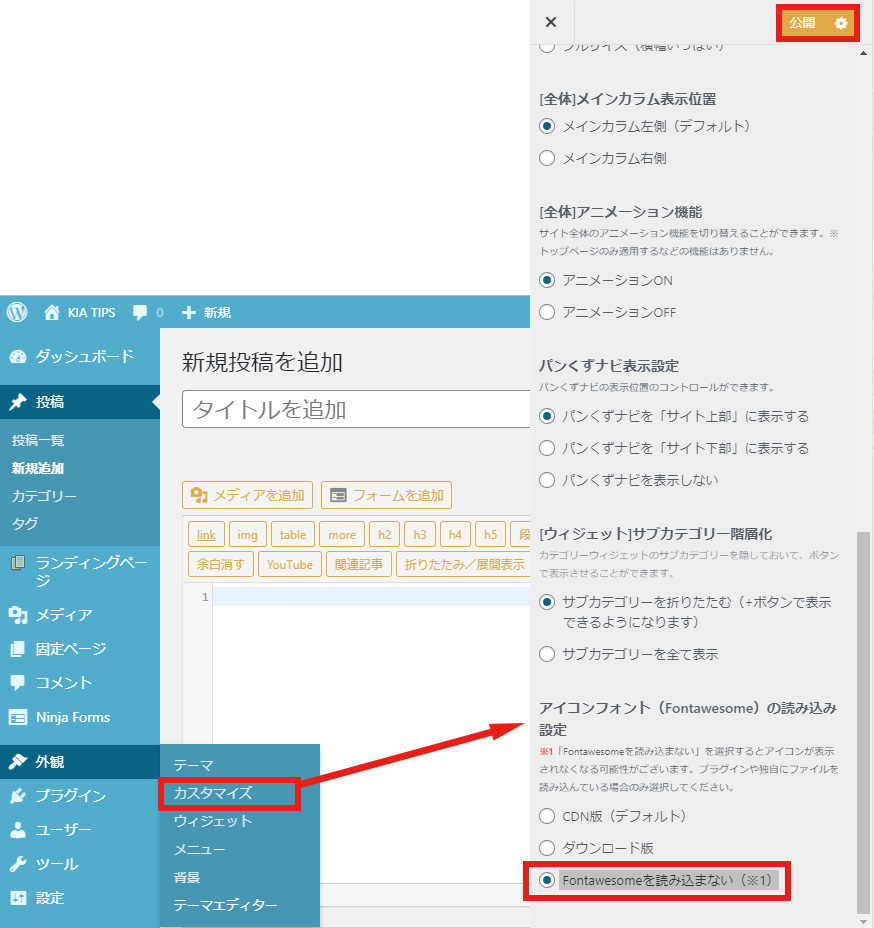
まずはSTORK側で読み込まれている旧FontAwesomeの読み込みを解除しましょう。
WordPress管理画面で「外観」→「カスタマイズ」と進み「グローバル設定」を開きます。
「アイコンフォント(Fontawesome)の読み込み設定」項目で「Fontawesomeを読み込まない(※1)」を選択し、上部の「公開」ボタンを押して保存してください。
FontAwesome5をfunction.phpから読み込む
「外観」の「テーマエディター」から「テーマのための関数(function.php)」に以下のコードをコピペして追加してください。
// FontAwesome5の読み込み
function add_child_script() {
    wp_enqueue_style( 'fontawesome', 'https://cdnjs.cloudflare.com/ajax/libs/font-awesome/5.9.0/css/all.css' );
}
add_action('wp_enqueue_scripts', 'add_child_script');
※こちらのコードでは執筆時点で最新バージョン5.9.0(CDN版)を読み込んでいます。
FontAwesome5用のコードをstyle.cssに追加する
旧版と最新版ではアイコン表示時のCSSが変更されているため、この時点でサイト内のアイコンがすべて表示できなくなっているはずです。
次はそちらを修正するため、「テーマエディタ」より「style.css」に以下のコードをコピペして追加してください。
/* =========================
  Font Awesome 5
========================= */
.remodal-close:before {
    font-family: "Font Awesome 5 Free"!important;
    font-weight: 900;
}
.slick-next:before {
    font-family: "Font Awesome 5 Free"!important;
    font-weight: 900;
    content: '\f105';
}
.slick-prev:before {
	font-family: "Font Awesome 5 Free"!important;
    font-weight: 900;
    content: '\f104';
}
.entry-content a[target="_blank"]:after {
	font-family:"Font Awesome 5 Free";
	font-weight:900;
    content: '\f35d';
}
.header-info a:before {
	font-family:"Font Awesome 5 Free";
	font-weight:900;
}
#breadcrumb li.bc_homelink a::before{
	font-family:"Font Awesome 5 Free";
	font-weight:900;
}
.menu-sp > ul:after {
	font-family:"Font Awesome 5 Free";
	font-weight:900;
}
.article-footer .post-categories a:before,
.article-footer .tags a:before {
	font-family:"Font Awesome 5 Free";
	font-weight:900;
}
.article-footer .post-categories a:before {
    content: '\f07b';
}
.authorbox .author_sns li a::before {
	font-family:"Font Awesome 5 Brands";
	font-weight:400;
}
.authorbox .author_sns li.author-site a::before {
    content: "\f19a";
}
.np-post .next a .eyecatch:after,
.np-post .prev a .eyecatch:before {
	font-family:"Font Awesome 5 Free";
	font-weight:900;
}
.byline .date:before,
.byline .writer:before {
	font-family:"Font Awesome 5 Free";
	font-weight:900;
}
.byline .cat-name:before {
	font-family:"Font Awesome 5 Free";
	font-weight:900;
}
.entry-content blockquote:before,
.entry-content blockquote:after {
	font-family:"Font Awesome 5 Free";
	font-weight:900;
}
.widget.widget_categories li a:after,
.widget.widget_recent_entries li a:after,
.widget.widget_nav_menu li a:after,
.widget.widget_pages li a:after,
.widget.widget_archive li a:after,
.widget.widget_mycategoryorder li a:after {
	font-family:"Font Awesome 5 Free";
	font-weight:900;
}
.accordionBtn::before {
	font-family:"Font Awesome 5 Free";
	font-weight:900;
}
.readmore a:after {
	font-family:"Font Awesome 5 Free";
	font-weight:900;
}
#reply-title:before {
	font-family:"Font Awesome 5 Free";
	font-weight:900;
    content: "\f4ad";
}
#page-top a.pt-button::before{
	font-family:"Font Awesome 5 Free";
	font-weight:900;
}
.supplement:before {
    font-family: "Font Awesome 5 Free"!important;
    font-weight: 900;
	content: '\f086'!important;
}

/*  FontAwesome5 SP用
------------------------*/
@media only screen and (min-width: 768px) {
	.nav_btn.search_btn:before {
		font-family:"Font Awesome 5 Free";
		font-weight:900;
	}
	.search_btn:before {
		font-family:"Font Awesome 5 Free";
		font-weight:900;
	}
	.sp_g_nav > li > a:after {
		font-family:"Font Awesome 5 Free";
		font-weight:900;
	}
	.footer-links li a:before {
		font-family:"Font Awesome 5 Free";
		font-weight:900;
	}
}
@media only screen and (max-width: 767px) {
	.nav_btn:before, .search_btn:before {
		font-family:"Font Awesome 5 Free";
		font-weight:900;
	}
}
このCSSを追加した時点でSTORK上のほとんどのアイコンがまた正常に表示できるようになります。
最後に記事シェアSNSアイコンの修正をしたら導入はすべて完了です。
SNSシェアボタンのアイコン部分を修正する

記事タイトル下と記事下のシェアボタンアイコン(Twitter, Facebook, Pocket)はHTMLタグで直接指定されているため、「parts_sns.php」と「parts_sns_short.php」の2つのファイルを修正する必要があります。
まずはじめに子テーマにこの2つのファイルを導入していきましょう。
子テーマを使わない場合は、こちらのの手順をスキップして次の手順「記事タイトル下アイコン修正」に進み、親テーマの「parts_sns.php」と「parts_sns_short.php」を直接編集してください。
ただしこの方法だとSTORKがバージョンアップした際に、その都度該当箇所の修正が必要となります。
親テーマからFTPソフトで必要ファイルをダウンロード
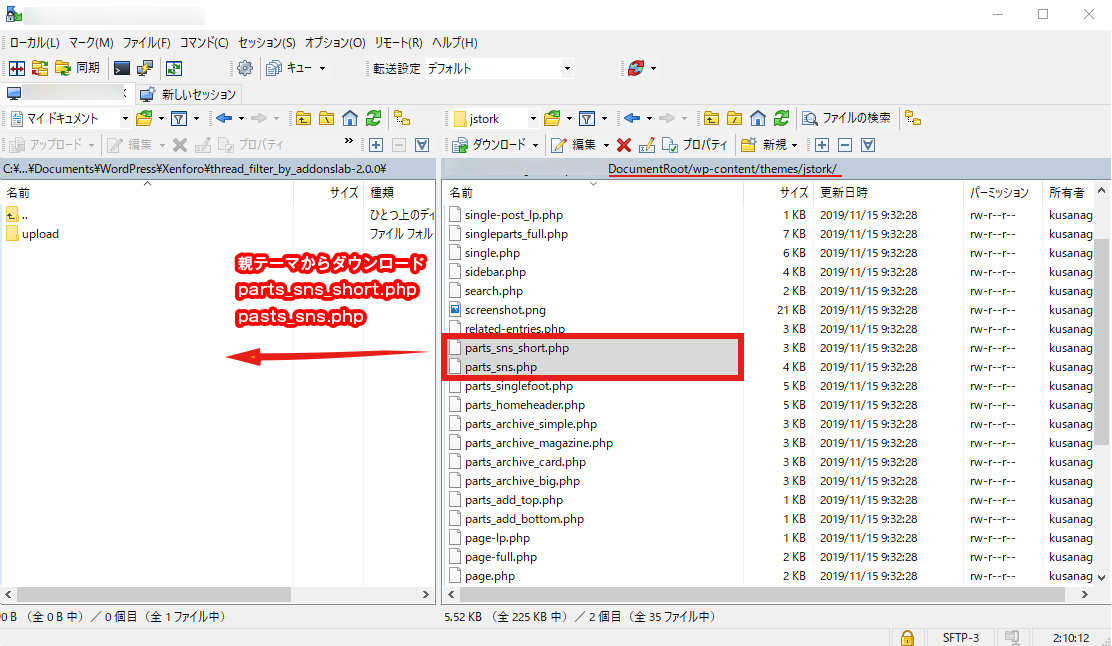
WinSCP等のFTPソフトを使って親テーマのディレクトリ
wp-content/themes/jstork
から「parts_sns.php」と「parts_sns_short.php」をダウンロードましょう。
子テーマにファイルをアップロード
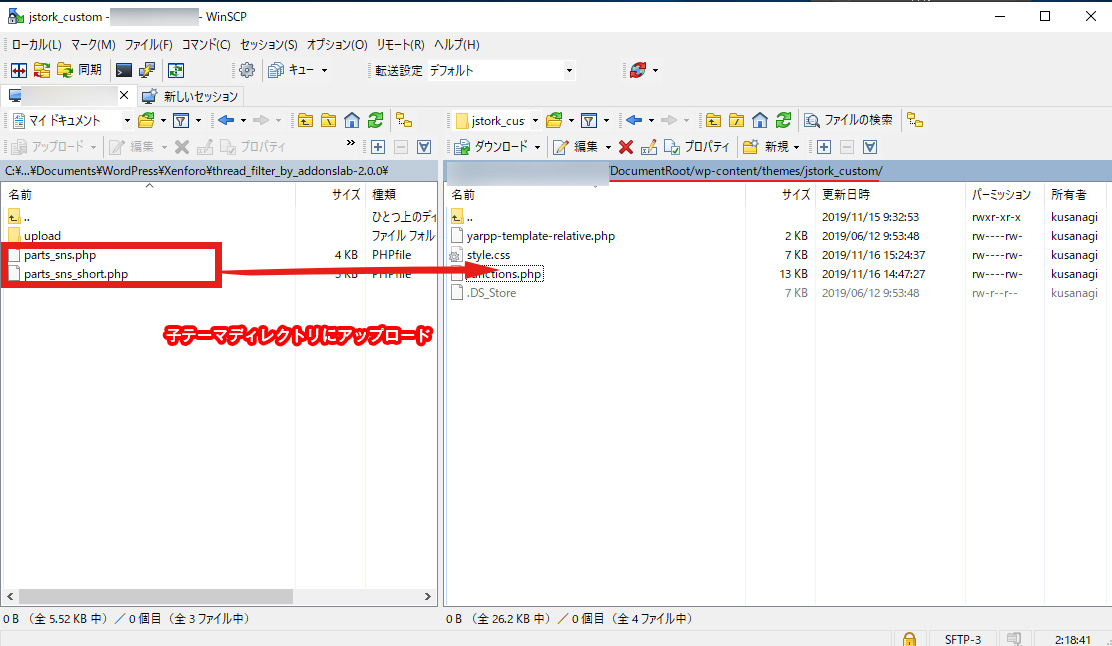
次にダウンロードした2つのファイルを子テーマのディレクトリ
wp-content/themes/jstork_custom
にアップロードしてください。
記事タイトル下アイコン修正
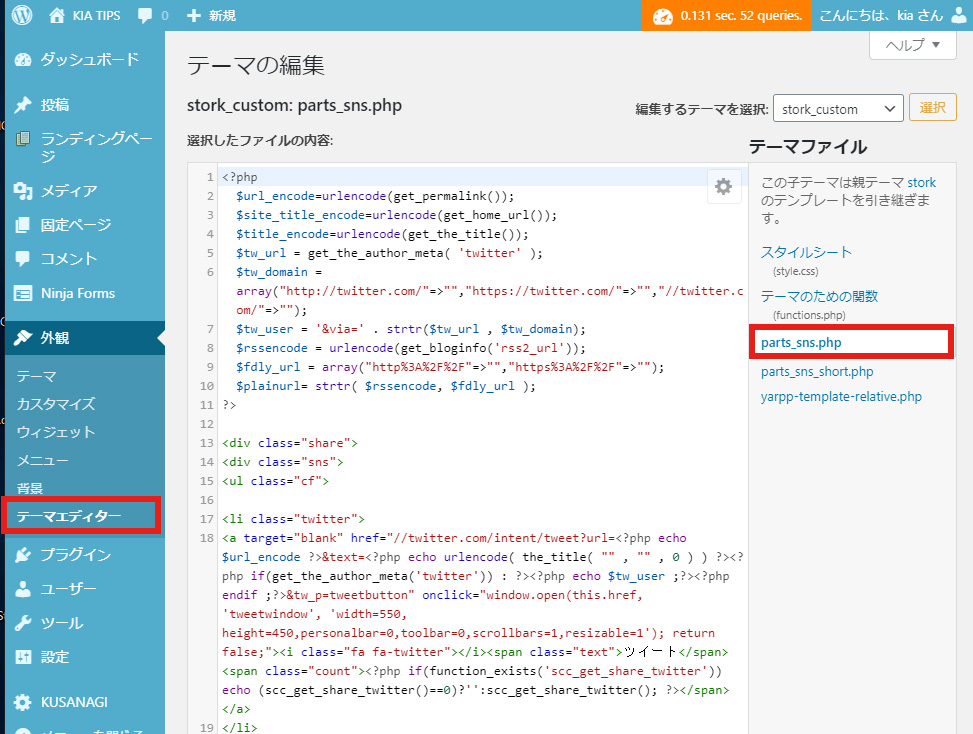
WordPress管理画面メニュー左側より「外観」⇛「テーマエディター」を開いて、右側のメニューから「parts_sns.php」を選択しましょう。
下記コードをそのまま全てコピペして保存してください。
<?php
  $url_encode=urlencode(get_permalink());
  $site_title_encode=urlencode(get_home_url());
  $title_encode=urlencode(get_the_title());
  $tw_url = get_the_author_meta( 'twitter' );
  $tw_domain = array("http://twitter.com/"=>"","https://twitter.com/"=>"","//twitter.com/"=>"");
  $tw_user = '&via=' . strtr($tw_url , $tw_domain);
  $rssencode = urlencode(get_bloginfo('rss2_url'));
  $fdly_url = array("http%3A%2F%2F"=>"","https%3A%2F%2F"=>"");
  $plainurl= strtr( $rssencode, $fdly_url );
?>

<div class="share">
<div class="sns">
<ul class="cf">

<li class="twitter">
<a target="blank" href="//twitter.com/intent/tweet?url=<?php echo $url_encode ?>&text=<?php echo urlencode( the_title( "" , "" , 0 ) ) ?><?php if(get_the_author_meta('twitter')) : ?><?php echo $tw_user ;?><?php endif ;?>&tw_p=tweetbutton" onclick="window.open(this.href, 'tweetwindow', 'width=550, height=450,personalbar=0,toolbar=0,scrollbars=1,resizable=1'); return false;"><i class="fab fa-twitter"></i><span class="text">ツイート</span><span class="count"><?php if(function_exists('scc_get_share_twitter')) echo (scc_get_share_twitter()==0)?'':scc_get_share_twitter(); ?></span></a>
</li>

<li class="facebook">
<a href="//www.facebook.com/sharer.php?src=bm&u=<?php echo $url_encode;?>&t=<?php echo $title_encode;?>" onclick="javascript:window.open(this.href, '', 'menubar=no,toolbar=no,resizable=yes,scrollbars=yes,height=300,width=600');return false;"><i class="fab fa-facebook"></i>
<span class="text">シェア</span><span class="count"><?php if(function_exists('scc_get_share_facebook')) echo (scc_get_share_facebook()==0)?'':scc_get_share_facebook(); ?></span></a>
</li>

<li class="hatebu">
<a href="//b.hatena.ne.jp/add?mode=confirm&url=<?php the_permalink() ?>&title=<?php echo urlencode( the_title( "" , "" , 0 ) ) ?>" onclick="window.open(this.href, 'HBwindow', 'width=600, height=400, menubar=no, toolbar=no, scrollbars=yes'); return false;" target="_blank"><span class="text">はてブ</span><span class="count"><?php if(function_exists('scc_get_share_hatebu')) echo (scc_get_share_hatebu()==0)?'':scc_get_share_hatebu(); ?></span></a>
</li>

<li class="line">
<a href="//line.me/R/msg/text/?<?php echo $title_encode . '%0A' . $url_encode;?>" target="_blank"><span>LINE</span></a>
</li>

<li class="pocket">
<a href="//getpocket.com/edit?url=<?php the_permalink() ?>&title=<?php the_title(); ?>" onclick="window.open(this.href, 'FBwindow', 'width=550, height=350, menubar=no, toolbar=no, scrollbars=yes'); return false;"><i class="fab fa-get-pocket"></i><span class="text">Pocket</span><span class="count"><?php if(function_exists('scc_get_share_pocket')) echo (scc_get_share_pocket()==0)?'':scc_get_share_pocket(); ?></span></a></li>

<li class="feedly">
<a href="https://feedly.com/i/subscription/feed/<?php echo urlencode(bloginfo('rss2_url')) ;?>"  target="blank"><i class="fas fa-rss"></i><span class="text">feedly</span><span class="count"><?php if(function_exists('scc_get_follow_feedly')) echo (scc_get_follow_feedly()==0)?'':scc_get_follow_feedly(); ?></span></a></li>
</ul>
</div>
</div>
修正箇所
長々と書いていますが、元ファイルからの修正箇所は下記の3箇所だけです。
- 18行目:
fa fa-twitter⇛fab fa-twitter - 22行目:
fa fa-facebook⇛fab fa-facebook - 35行目:
fa fa-get-pocket⇛fab fa-get-pocket
「fa」となっていたところを「fab」に書き換えているだけです。自身でこちらの3箇所を修正しても、もちろん構いません。
記事最下部アイコン修正
同様に記事下のシェアアイコン部分「parts_sns_short.php」も修正します。
こちらもまるまるコピペでも該当部分を修正でもOKです。
<?php
  $url_encode=urlencode(get_permalink());
  $title_encode=urlencode(get_the_title());
  $tw_url = get_the_author_meta( 'twitter' );
  $tw_domain = array("http://twitter.com/"=>"","https://twitter.com/"=>"","//twitter.com/"=>"");
  $tw_user = '&via=' . strtr($tw_url , $tw_domain);
?>
<div class="share short">
<div class="sns">
<ul class="cf">

<li class="twitter">
<a target="blank" href="//twitter.com/intent/tweet?url=<?php echo $url_encode ?>&text=<?php echo urlencode( the_title( "" , "" , 0 ) ) ?><?php if(get_the_author_meta('twitter')) : ?><?php echo $tw_user ;?><?php endif ;?>&tw_p=tweetbutton" onclick="window.open(this.href, 'tweetwindow', 'width=550, height=450,personalbar=0,toolbar=0,scrollbars=1,resizable=1'); return false;"><i class="fab fa-twitter"></i><span class="text">ツイート</span><span class="count"><?php if(function_exists('scc_get_share_twitter')) echo (scc_get_share_twitter()==0)?'':scc_get_share_twitter(); ?></span></a>
</li>

<li class="facebook">
<a href="//www.facebook.com/sharer.php?src=bm&u=<?php echo $url_encode;?>&t=<?php echo $title_encode;?>" onclick="javascript:window.open(this.href, '', 'menubar=no,toolbar=no,resizable=yes,scrollbars=yes,height=300,width=600');return false;"><i class="fab fa-facebook"></i>
<span class="text">シェア</span><span class="count"><?php if(function_exists('scc_get_share_facebook')) echo (scc_get_share_facebook()==0)?'':scc_get_share_facebook(); ?></span></a>
</li>

<li class="hatebu">
<a href="//b.hatena.ne.jp/add?mode=confirm&url=<?php the_permalink() ?>&title=<?php echo urlencode( the_title( "" , "" , 0 ) ) ?>" onclick="window.open(this.href, 'HBwindow', 'width=600, height=400, menubar=no, toolbar=no, scrollbars=yes'); return false;" target="_blank"><span class="text">はてブ</span><span class="count"><?php if(function_exists('scc_get_share_hatebu')) echo (scc_get_share_hatebu()==0)?'':scc_get_share_hatebu(); ?></span></a>
</li>

<li class="line">
<a href="//line.me/R/msg/text/?<?php echo $title_encode . '%0A' . $url_encode;?>" target="_blank"><span>LINE</span></a>
</li>

<li class="pocket">
<a href="//getpocket.com/edit?url=<?php the_permalink() ?>&title=<?php the_title(); ?>" onclick="window.open(this.href, 'FBwindow', 'width=550, height=350, menubar=no, toolbar=no, scrollbars=yes'); return false;"><i class="fab fa-get-pocket"></i><span class="text">Pocket</span><span class="count"><?php if(function_exists('scc_get_share_pocket')) echo (scc_get_share_pocket()==0)?'':scc_get_share_pocket(); ?></span></a></li>

</ul>
</div>
</div>
修正箇所
- 13行目:
fa fa-twitter⇛fab fa-twitter - 17行目:
fa fa-facebook⇛fab fa-facebook - 30行目:
fa fa-get-pocket⇛fab fa-get-pocket
こちらも「fa」となっていたところを「fab」に書き換えただけです。
さいごに
お疲れさまでした!以上でSTORKへの最新版FontAwesome5導入はすべて完了です。
ご不明な点や表示されないアイコンがありましたらどうぞお気軽にコメント欄よりご質問ください。




コメントする